WotT Tripwire for NinjaTrader
Free drag-and-drop price alerts for NinjaTrader 8 — drag the bell onto the chart, get a sound when price touches the level. Move, remove and re-arm alerts right on the chart; one set per contract, shared by all its charts and saved between sessions.
A price-alert tool for futures traders who watch a handful of prices during the session: a level from the plan, the far side of a range, the price where the stop would move. One drag puts a line there and one sound tells you price has arrived. Everything happens on the chart — no alert window, no conditions to fill in, no drawing object to configure. Runs entirely inside NinjaTrader 8.
Alerts
A price alert should take one second
NinjaTrader's own price alert is a separate window: right-click, Alerts, a condition, an action, a sound — a dozen clicks in all — and a line with an alert attached doesn't re-arm when you move it. In a live session those are minutes you don't have, so the alert doesn't get set and the level gets watched with one eye instead.
WotT Tripwire makes it one gesture:
- Drag the bell, drop it on the price. A dashed line appears across the chart with a label showing the price and the distance in ticks. Hold Alt and click anywhere on the chart for the same result under the cursor.
- Price touches the line, you hear it. Every trade is checked. A touch fires the alert, and so does a move that gaps straight through the level. One sound per hit, however many charts of that contract are open.
- Move, remove, re-arm on the chart. Drag the label to a new price. Click × to remove. Click the label of a fired alert to arm it again on the same price. Nothing opens.
- It remembers. Alerts belong to the contract, not the chart: every chart of
MNQ DEC26shows the same lines, and they come back after F5, after closing the chart and after restarting NinjaTrader.
A line and a sound — nothing else, by design. The indicator never places, moves or cancels an order.
Flow
How it works
Add it to a chart
Indicators → WotT Tripwire. A small bell button appears in the top-right corner of the price panel. Any instrument, any bar type: the indicator reads the tick size from the instrument.
Drag the bell
Press the bell and drag. A dashed ghost line follows the cursor, snapping to whole ticks, with a label such as
29807.75 +7t: the price, and the distance from the last trade. Drop it and the alert is set. Release over the bell or outside the price panel, or press Esc, and nothing happens. The chart doesn't scroll while you drag.Or Alt+click
Hold Alt and left-click anywhere on the price panel. The alert goes exactly where you clicked, no drag needed. (On by default; a setting turns it off.)
Read the label
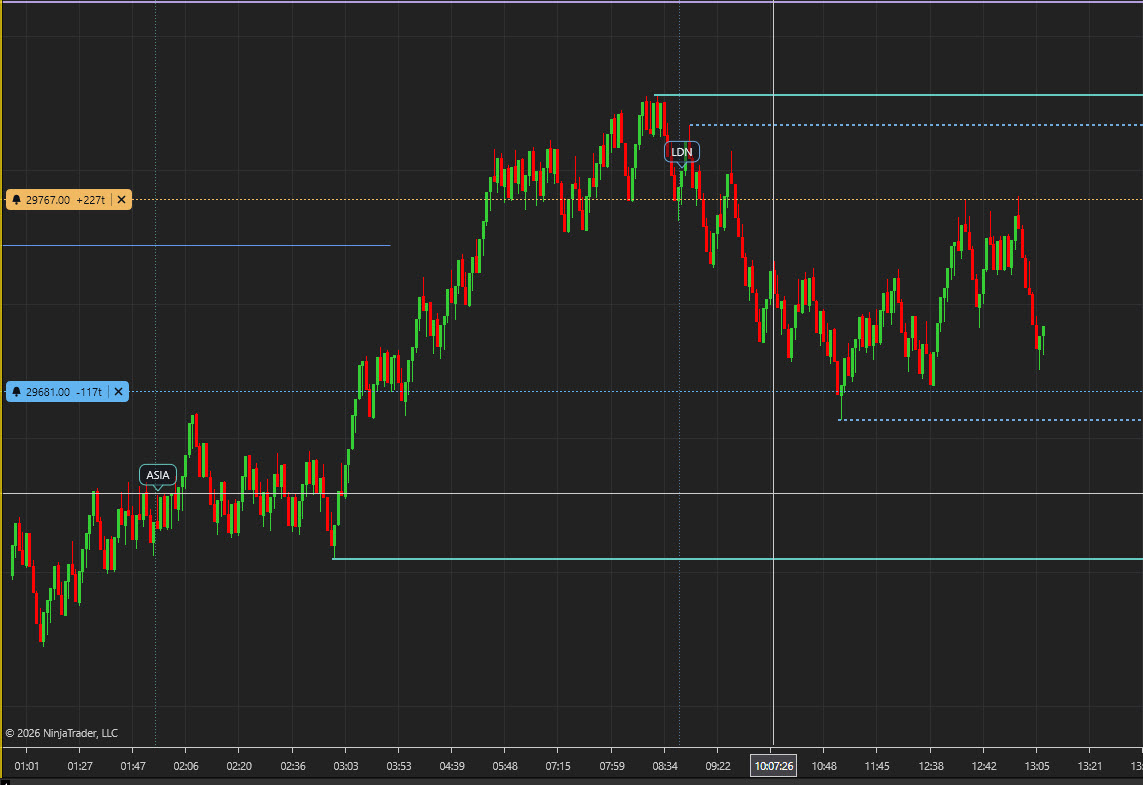
An alert above price is amber, below price blue. Its label at the left edge shows a small bell, the price, the distance in ticks —
+7t,-14t, updated with every trade — and a × button. A level outside the visible price range keeps its label, pinned to the top or bottom edge with ▲ or ▼.Hear it
When a trade touches or crosses the level, the "WotT Ping" sounds — a short double ping generated by the indicator itself — and the line turns solid and magenta with
HIT 08:28:53in the label. The fired line disappears after 30 seconds, or stays until you click it or remove it, as you prefer.Change your mind
Drag the label to move the alert; the direction is worked out again from the new price. Click × to remove it. Click the label of a fired alert to arm it again. Only the label reacts to the mouse, never the line, so drawings and orders sitting at the same price stay clickable.
Principles
Built like a trading tool, not a widget
The indicator has one job: tell you, with a sound, that price has reached a level you chose. Everything else — entries, orders, risk — stays where it belongs.
Zero integration with orders or ATM
It draws a line and plays a sound. Nothing in it can place, change or cancel an order. Where your stop goes is still your decision and your click.
Everything happens on the chart
No alert window, no conditions, no drawing-object properties. Set, move, remove and re-arm with the mouse, in the place you are already looking.
One set of alerts for every chart
Alerts are kept per contract, not per chart. Open a second chart of the same contract and the lines are already there; a hit sounds once, not once per chart.
A sound you won't confuse
The built-in "WotT Ping" is generated by the indicator: a short double ping that sounds like nothing else in NinjaTrader, and unlike the Event Monitor's chime, so your ear knows whether it is price or the calendar. Any WAV file works instead.
States
What the lines and labels mean
| What you see | Meaning |
|---|---|
| Dark square with a bell, in a corner of the chart | The bell button. Press and drag it to set an alert |
| The bell turns amber | You are dragging; a dashed ghost line shows where the alert will go |
| Dashed line in the chart's text colour, label beside the cursor | Ghost: the alert is being placed or moved. Nothing is set until you release |
Dashed amber line with 29807.75 +7t and × | Armed alert above the current price; fires on the first trade at 29807.75 or higher |
Dashed blue line with 29800.50 -14t and × | Armed alert below the current price; fires on the first trade at 29800.50 or lower |
Solid, slightly thicker magenta line with 29800.50 HIT 08:28:53 | The alert fired at that time. Click the label to arm it again, click × to remove it, or wait for it to disappear |
▲ 29896.00 +160t at the top edge, ▼ … at the bottom edge | An armed alert outside the visible price range. It still fires, still has ×, and can be dragged back into view |
Colours are settings; the defaults are amber above, blue below, magenta for fired. On a light chart background the lines switch to darker shades of the same colours automatically.
Settings
Every option
Right-click the chart → Indicators → WotT Tripwire. Three groups.
| Group | Setting | Default | What it does |
|---|---|---|---|
| Alert | Alert sound | WotT Ping | The built-in double ping, written once to Documents\NinjaTrader 8\sounds\WotTTripwire-Ping.wav. Or the name of any WAV file in NinjaTrader's sounds folder, or a full path. If the file is missing, NinjaTrader's Connected.wav plays instead |
| Alert | Remove fired line after (sec) | 30 | How long a fired line stays on the chart. 0 = it stays until you click it (re-arm) or remove it. 0–3600 |
| Alert | Alt+Click quick alert | on | Alt + left-click on the price panel sets an alert under the cursor. The right Alt key works too |
| Alert | Also log to Alerts Log | off | Adds every hit to NinjaTrader's Alerts Log window, e.g. MNQ DEC26: Tripwire 29800.50 hit (down), last 29800.50 |
| Appearance | Bell corner | TopRight | Which corner of the price panel the bell sits in: TopRight, TopLeft, BottomRight or BottomLeft. Top-right moves aside for NinjaTrader's "scroll to latest bar" button; bottom-left stays above the copyright line |
| Appearance | Label side | Left | Left keeps the labels clear of the latest candles and of Chart Trader's order markers. Right puts them next to the price axis |
| Appearance | Color: level above price | amber #F0B860 | Line and label of an alert waiting for a rise |
| Appearance | Color: level below price | blue #5FB3F0 | Line and label of an alert waiting for a fall |
| Appearance | Color: fired | magenta #FF00FF | Line and label after the alert has fired |
| Appearance | Line width | 1 | Width of the alert lines in pixels, 1–5. A fired line is drawn one pixel thicker |
| About | Version, Website | read-only | The installed version and the address of this page |
There is nothing to configure before the first alert. The defaults are the ones the tool was built and traded with.
Features
At a glance
- Drag-and-drop price alerts: a bell button in a corner of the chart, a line where you drop it
- Alt+click for an alert straight under the cursor
- Label with the price, the live distance in ticks and a × button; labels of nearby levels sit side by side instead of overlapping
- Move by dragging the label, remove with ×, re-arm a fired alert with one click — no confirmations, no windows
- Fires on a touch or a gap through the level, checked on every trade; an alert placed on the current price waits until price moves away and comes back
- "WotT Ping" sound generated by the indicator, or any WAV file; optional entry in NinjaTrader's Alerts Log
- Fired alerts: solid line,
HITwith the time, removed after a set number of seconds or kept until you click - Levels outside the visible range shown as ▲ / ▼ labels at the edge, still armed, still draggable
- One set of alerts per contract, shared live by every chart of that contract; one sound per hit
- Saved to a plain text file after every change; alerts survive F5, closing the chart and restarting NinjaTrader
- Market Replay keeps its own list, separate from live
- Keeps working while the chart is in a background tab or minimized
- Any instrument, any bar type, any tick size
- The line never catches mouse clicks: drawings and orders at the same price work as before
- Four bell corners, label side, colours and line width as settings
- Free — no subscription, no registration
Who it's for
User profile
A futures day trader — NQ/MNQ, ES/MES, or anything else with a tick size — who watches a few prices during the session: a level from the plan, the other side of the range, the price at which the stop would move. They want a sound when price gets there, and they don't want to leave the chart or open a window to ask for it.
Requirements
Environment
- NinjaTrader 8 (8.1+) on Windows
- A chart with a live data connection. Alerts are checked on incoming trades, so nothing fires while NinjaTrader is closed or disconnected
- Nothing else — no internet connection of its own, no accounts, no other add-ons
Next up, depending on what users ask for: a sound that repeats until you acknowledge it, and a push notification to your phone.
FAQ
Common questions
Does it fire when the chart is in a background tab, or NinjaTrader is minimized?
Yes. The indicator keeps running when its chart is not in front. It does need NinjaTrader open and connected to data: this is not a server-side alert, and nothing fires while the platform is closed.
Will it send the alert to my phone?
No. Version 1.0 plays a sound on the PC that runs NinjaTrader and, if you switch it on, writes a line in NinjaTrader's Alerts Log. Push notifications are on the list for a later version.
Price jumped over my level without trading exactly at it. Did I miss the alert?
No. An alert above price fires on the first trade at or above the level, an alert below price on the first trade at or below it. A gap through the level counts.
I put the alert right on the current price and nothing happened.
By design. An alert placed on the price that is trading right now waits until price moves away by at least a tick, and fires when it comes back. Otherwise it would fire the moment you let go.
How do I move an alert? Clicking the line does nothing.
Drag the label, not the line. The line deliberately ignores the mouse, so that a horizontal line, a drawing or a Chart Trader order sitting at the same price stays clickable. While you drag, the alert is drawn as a ghost; drop it and it is armed on the new price with the direction worked out again. Esc cancels.
What happens to a fired alert?
Its line turns solid and magenta, and its label shows HIT with the time. After 30 seconds it disappears ("Remove fired line after"). Set that to 0 and the line stays: click the label to arm it again on the same price, or × to remove it.
I opened a second chart of the same contract. Where are my alerts?
Already on it. Alerts are kept per contract, so a 30-range chart and a 1-minute chart of MNQ DEC26 show the same lines, and a change on one appears on the other at once. A hit sounds once.
Where are the alerts saved?
In Documents\NinjaTrader 8\WotT\Tripwire\<contract>.txt, one line per alert, rewritten after every change. The file is removed when the last alert goes. Deleting it while NinjaTrader is closed removes the alerts of that contract.
My alerts vanished after the contract rolled.
Each contract has its own list. The new contract starts empty, because its prices are different; the old contract's file stays on disk.
Does it work in Market Replay?
Yes, and it keeps replay alerts apart from live ones: under a Playback connection the list and the file get a _playback suffix, so a test never leaves a stray alert on the live chart.
Can I use my own sound?
Yes. In "Alert sound" put the name of any WAV file from NinjaTrader's sounds folder, or a full path. WotT Ping brings the built-in sound back.
Two charts, and the fired line disappeared sooner on one of them.
"Remove fired line after" is a setting of each chart, while the fired line is shared. Whichever chart's timer runs out first removes it for both. Give both charts the same value if that matters to you.
Alt+click does nothing.
Check that "Alt+Click quick alert" is on, and that you clicked on the price panel itself — not on the bell, a label, the price axis or an indicator panel below. Both Alt keys work, AltGr included.
Does it place orders or move my stop?
No. It draws a line and plays a sound. Nothing else.
WotT Tripwire is a convenience tool. An alert fires on the trades your platform receives, only while NinjaTrader is running and connected, and a missed or late alert is possible. Nothing here is investment advice. Trading futures involves substantial risk of loss.
Install
Three steps
Download the zip
Grab
WotTTripwire_v1.0.0.zipbelow. Don't unzip it — NinjaTrader imports the archive as-is.Import into NinjaTrader 8
Tools → Import → NinjaScript Add-On → pick the zip. NinjaTrader confirms the import.
Add it to a chart
Indicators → WotT Tripwire → OK. Done — the bell appears in the top-right corner of the chart. Drag it onto a price.
Before you use it
- Test it on a simulation account with the exact settings you plan to use.
- Watch your positions on every account. Be ready to flatten directly in NinjaTrader.
- Check that your prop firm or broker allows this kind of tool.
The tool is free and provided as is. Full terms: Software License.
📄 Installation guide (README) — requirements, import steps, quick start, update & uninstall.
Changelog
- Initial public release
- Drag-and-drop price alerts: drag the bell from the corner of the chart onto a price, or Alt+click; label with the price, the live distance in ticks and a × button
- Move by dragging the label, remove with ×, re-arm a fired alert with one click; the line itself never catches mouse clicks
- Fires on a touch or a gap through the level, checked on every trade; one sound per hit; an alert placed on the current price waits for price to leave and return
- "WotT Ping" sound generated by the indicator, any WAV file as an alternative, optional entry in NinjaTrader's Alerts Log; fired line drawn solid with
HITand the time, removed after a set time or kept - Levels outside the visible range as ▲ / ▼ labels at the edge; labels of nearby levels placed side by side
- One set of alerts per contract, shared live by all its charts and saved to a text file after every change; Market Replay kept separate
- Four bell corners, label side, colours and line width as settings
- Free, closed-source, no subscription