Market Profile (TPO) on NQ: Letters, Value Area and How It Differs From Volume Profile
A volume profile shows where contracts traded; a Market Profile shows where the market spent time. How TPO letters build one NQ session, how the point of control and the 70% value area are counted, why time and volume disagree on some days, and where to show TPO in TradingView and NinjaTrader 8.
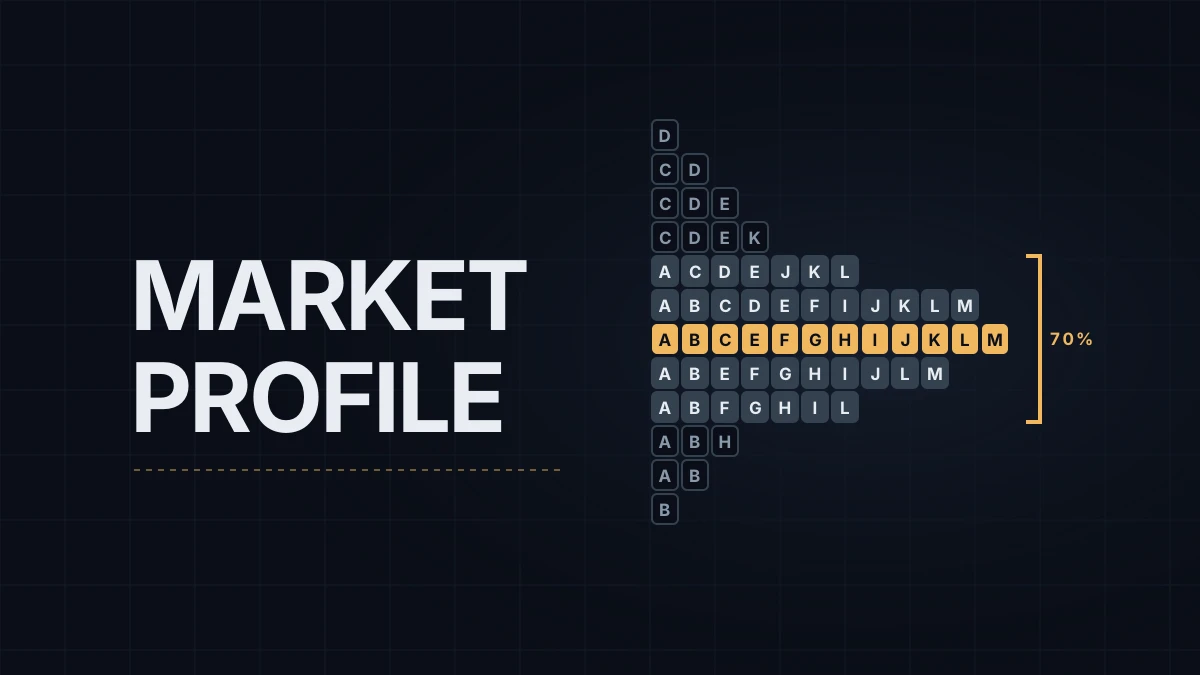
A volume profile shows where contracts traded. A Market Profile shows where the market spent time. Both turn a session into a sideways histogram of prices, and on many NQ days they end up close to each other; the days they don't are the reason to know both. This post covers how a Market Profile TPO chart is built, how its value area is counted and where to display one.
TPO stands for time price opportunity, one mark for one price in one time period. The idea came from J. Peter Steidlmayer, a trader at the Chicago Board of Trade, and the CBOT launched it as Market Profile in the mid-1980s. The examples below use NQ, the E-mini Nasdaq-100 future; if the contract itself is new, tick and point value comes first.
Letters and periods
The session is cut into 30-minute periods and each gets a letter. Every price that traded during a period gets that period's letter, and the letters for each price are printed side by side. A price that traded in nine periods ends up with nine letters; the one that traded only once has one.
Here is an illustrative regular session on NQ, 9:30 AM to 4:00 PM ET (15:30 to 22:00 CEST), with A starting at 9:30 and M ending at 4:00, in rows of 5 points:
25,125  D
25,120  CD
25,115  CDE
25,110  CDEK
25,105  ACDEJKL
25,100  ABCDEFIJKLM
25,095  ABCEFGHIJKLM   <- POC (12 TPOs)
25,090  ABEFGHIJLM
25,085  ABFGHIL
25,080  ABH
25,075  AB
25,070  B
The first hour, periods A and B, is the initial balance: 25,070 to 25,105 here, 35 points. C pushed above it to 25,120 and D to 25,125, which Market Profile calls range extension, and from midday the session rotated back through the 25,080 to 25,110 area. Opening range and initial balance covers how NQ behaves around that first-hour box.
The point of control (POC) is the price with the most TPOs, 25,095 with twelve. When two prices tie, the original CBOT convention picks the one nearer the middle of the range.
The value area holds 70% of all TPOs around the POC. This session has 63 TPOs, so the value area needs 44.1. Start at the POC (12) and add one row at a time on whichever side has more: 25,100 (11) brings it to 23, 25,090 (10) to 33, then 25,105 and 25,085, tied at 7 each and both added, to 47. The value area runs from 25,085 to 25,105.
Time against volume
A TPO counts every 30-minute visit to a price the same, whether two hundred contracts changed hands there or twenty thousand. A volume profile counts contracts. Most of the time the two land near each other, because price spends time where trade happens.
They part ways in two common situations. A fast move on a data release can trade heavy volume across a few prices in a few minutes, which a volume profile records and a TPO chart barely notices. A slow lunch rotation leaves many letters on thin volume, which weighs heavily in TPO and lightly in volume. In the session above, if the C and D periods had carried most of the day's contracts, a volume-based value area would sit higher than 25,085 to 25,105, while the TPO version gives the afternoon rotation its full weight.
The arithmetic also varies by platform. Some add one row at a time when expanding the value area, as above; the CBOT method and some charting packages add two rows at a time; default percentages differ (70% in TradingView's TPO, 68% in NinjaTrader's volume profile). The same session can therefore show value area edges a row or two apart from one platform to the next, although in the example above both methods land on 25,085 and 25,105. The volume-based POC, VAH and VAL in key levels on NQ are the more common version for marking levels, and a TPO value area is a second opinion on the same session.
Which session gets the letters
The letters depend on where the profile starts. On a profile limited to regular trading hours, A is 9:30 AM ET and the initial balance is the first hour of the US cash session. On a profile covering the full Globex session, which opens at 6:00 PM ET (00:00 CEST), A goes to the evening, and the first hour is no longer the US open.
Conventions for the letters themselves aren't uniform either. The original CBOT scheme tied letters to clock time, and NinjaTrader's help guide starts A at a fixed 8:00 AM Central for every instrument, so on its Price profile the 9:30 AM ET open isn't the A period. TradingView's TPO counts A to Z and then lowercase from the start of each profile. Before reading "the A period" off someone else's chart, check which scheme and which session it uses.
Where to display it
TradingView has a built-in Time Price Opportunity (TPO) indicator, a session version and a TPO chart type. At the time of writing they're listed on the Premium plan and above, not on Basic, Essential or Plus, the same as at launch in 2024. Settings include the profile period (one day by default), block size (30 minutes by default), row size (automatic or a set number of ticks), the value area percentage (70% by default) and the initial balance, with markers for single prints and poor highs and lows. On NQ, 20 ticks per row gives the 5-point rows used above. A free volume profile in TradingView covers the volume side of the same platform.
NinjaTrader 8 has no tool called Market Profile or TPO. The Order Flow+ Volume Profile has a Price profile type that prints letters or boxes for 30-minute windows, with a 68% value area by default, which is the closest built-in equivalent. Traders who want a full TPO chart in NinjaTrader, with split profiles and single-print markers, usually turn to third-party add-ons.
My morning levels are the POC, VAH and VAL of the Order Flow+ volume profile in NinjaTrader, marked before the session, and I treat a TPO view as context for the shape of the previous session rather than as a source of levels.
Educational content, not investment advice. Futures trading involves substantial risk of loss. Examples are for illustration only. Read the full Risk Disclosure.