Prop Firm Data Feeds: Tradovate/CQG vs Rithmic and What Differs on the Chart
Many futures prop firms make you pick Rithmic or Tradovate before you know what it changes. How each route packages CME's trades, why a tick chart and a large-trade filter behave differently on them, depth and MBO, where NinjaTrader's history comes from, and which firm offers which.
Rithmic or Tradovate is a question many futures prop firms ask at checkout, usually before a trader knows what it changes. The Rithmic vs Tradovate choice decides which platforms can connect to the account, and at some firms it can't be undone: Apex, for one, says an account can't be converted between its Rithmic, Tradovate and WealthCharts versions. It also changes a few things on the chart, and those are easier to live with when they're expected.
If evaluations themselves are new, what a prop firm evaluation is comes first. What follows is the plumbing under the account.
Two routes to one exchange
The E-mini Nasdaq-100 (NQ) trades in one order book on CME Globex and its micro version (MNQ) in another, and every route starts from the same exchange feed. The difference is the company between the exchange and the platform. Rithmic is a market data and order routing provider, and a Rithmic prop account can be traded from R|Trader Pro, Sierra Chart, Quantower, Bookmap, ATAS or NinjaTrader, depending on what the firm allows. Tradovate is a futures brokerage platform, and some prop firms that offer it, Lucid and Take Profit Trader among them, list its accounts as CQG accounts, after the market data company behind that route. In NinjaTrader 8 a Tradovate-based prop account uses the connection named NinjaTrader, as in the Lucid connection guide, and a Rithmic account uses Rithmic for NinjaTrader Brokerage.
Tick charts and prints
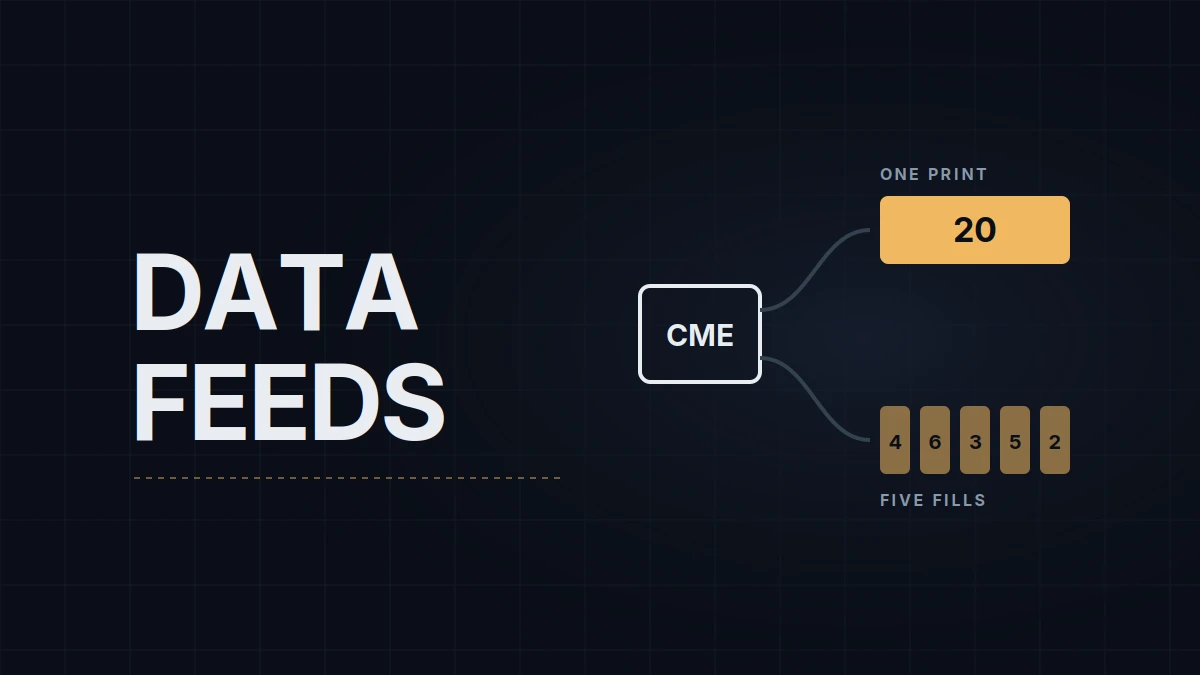
The exchange reports trades per aggressor. When one market order fills against several resting orders, CME's feed sends one trade summary for everything that order matched at a price, with the individual fills listed in a separate detail block. A data provider can pass that summary on or split it into the fills behind it. Rithmic splits it; NinjaTrader staff described its data as unbundled as far back as 2016. On the CQG side, NinjaTrader staff have described the feed both ways over the years, so the reliable check is to watch Time and Sales on both routes during the same minute.
The difference reaches the chart in two places. A tick bar counts trades, so the same tick setting closes bars at different moments on two routes that package trades differently: the chart has the same shape, but the bars end elsewhere. A large-trade filter counts contracts per print, so a 20-lot market buy that fills against five resting orders shows up as one 20-contract print on a route that keeps the exchange's summary and as five smaller prints on one that splits it. A filter set to 20 contracts catches only the first. Volume and range bars are built from contracts and prices, which don't change when prints are split, so the same trades give the same volume and range bars on both.
For anyone moving from one route to the other, that means tick settings don't transfer. Counting the bars a setting prints in a typical first hour on the old route, then adjusting the new route's setting until the count matches, gets the chart's pace back. Timeframes and bar types covers what each bar type counts.
Depth and market by order
CME's standard book feed carries 10 price levels a side. Deeper books come from market-by-order (MBO) data, which CME has published since 2017 and which shows every resting order in the queue; a provider can pass it on order by order or add it up into more price levels. NinjaTrader staff have said the number of levels on your screen is set by the data provider.
Three practical limits matter more than the level count. NinjaTrader 8's own connections don't deliver MBO data, according to its staff. On a Rithmic account, Bookmap's MBO tools need Bookmap connected to Rithmic directly with aggregated quotes switched off, and they don't work with Rithmic data passed through NinjaTrader, so on a prop account MBO on a Bookmap heatmap usually means a Rithmic account with Bookmap connected to it directly. And depth on a prop account is often an add-on tied to one route: at the time of writing Take Profit Trader offers depth only on its Rithmic accounts (one exchange free), Tradeify only on Tradovate accounts, where it's bought directly from Tradovate, and at Apex it's a paid add-on on both routes.
History after a reload
In NinjaTrader 8 a Rithmic account doesn't reload its history from Rithmic. NinjaTrader's own historical data servers supply it, as they do for the CQG-based connections, and they keep tick data for about a year. So the live bars come from Rithmic and the bars rebuilt after a restart come from those servers, and the two can differ for that reason alone. It's one of the causes covered in historical vs real-time data in NinjaTrader 8.
Speed is the other claim traders hear. Rithmic's own vendor description stresses low latency, and no independent comparison of the two routes on prop accounts is public. On an evaluation the orders are filled by the provider's simulated account in any case, not by the exchange, which how Sim101 and prop sims fill explains.
Which firm offers which
At the time of writing, from each firm's own pages:
| Firm | Routes and platforms | NinjaTrader 8 |
|---|---|---|
| Lucid Trading | CQG (NinjaTrader, Tradovate, TradingView); Rithmic (R|Trader Pro, Sierra Chart, Quantower, Bookmap, ATAS and others) | CQG route only |
| Apex Trader Funding | Rithmic, Tradovate or WealthCharts; no switching later | Rithmic or Tradovate |
| Topstep | TopstepX (Quantower connects through it) | Not supported |
| Take Profit Trader | CQG through Tradovate (NinjaTrader, Tradovate, TradingView); Rithmic (Bookmap, Quantower, ATAS, MotiveWave and others) | CQG route, Tradovate login |
| Tradeify | Tradovate (Tradovate, NinjaTrader, TradingView); Rithmic (Tradesea, Quantower, Sierra Chart, R|Trader); WealthCharts | Tradovate route only |
| My Funded Futures | Tradovate route (NinjaTrader, Tradovate, TradingView); dxFeed (Quantower, Volumetrica, ATAS, DeepChart); no Rithmic | NinjaTrader connection |
| Alpha Futures | AlphaTrader, TradingView (through Plus500), WealthCharts, Quantower, DeepChart | Dropped on July 12, 2026; existing accounts moving to AlphaTrader |
| Bulenox | Rithmic | Through Rithmic |
The pattern is that a firm's list of platforms, more than the feed itself, usually decides the route. A trader set on NinjaTrader 8 at Lucid, Take Profit Trader or Tradeify ends up on the Tradovate route whatever the tick-chart argument says, and at Topstep or Alpha Futures, NinjaTrader isn't an option.
Choosing a route
Platform first, then tools. MBO on a heatmap points to Rithmic with Bookmap connected directly; TradingView points to the Tradovate route. Depth and its price differ by route and by firm, so they belong on the checklist before the purchase rather than after. And a trader who reads tick charts is better off staying on one route, or recounting bars after a switch, than comparing settings across the two.
My accounts are on Lucid (affiliate link), traded through the Tradovate route in NinjaTrader 8, and the tick chart I keep for context was tuned on that feed. The same setting on a Rithmic chart would close its bars elsewhere, so it'd be recounted before any comparison.
Educational content, not investment advice. Futures trading involves substantial risk of loss. Examples are for illustration only. Read the full Risk Disclosure.