Enforcing a Daily Loss Limit in NinjaTrader 8: Account Risk Settings, ATM Limits and Lockout Add-Ons
NinjaTrader 8 can close positions at a set time and show how much of a limit you've used, but the limit that flattens the account and ends the day lives elsewhere: on a server, in a lockout you start by hand or in an add-on. What each one does when it matters.
NinjaTrader 8 has no setting that ends your trading day after a loss. The desktop platform can cap order size on its own simulation accounts, close positions at a set time and show how much of a limit you've used, but a NinjaTrader daily loss limit that flattens the account and ends the day has to live somewhere else: on the prop firm's server, in the account's risk settings on NinjaTrader's servers, in a lockout you start by hand, or in an add-on running next to your charts. They behave differently at the moment that matters, which is a bad morning with a position still open.
This post assumes a working platform and a connected account. The NinjaTrader 8 chart setup covers the first, and connecting a Lucid account through Tradovate the second.
What the platform has, and what it doesn't
Three things in NinjaTrader 8 look like risk controls from a distance.
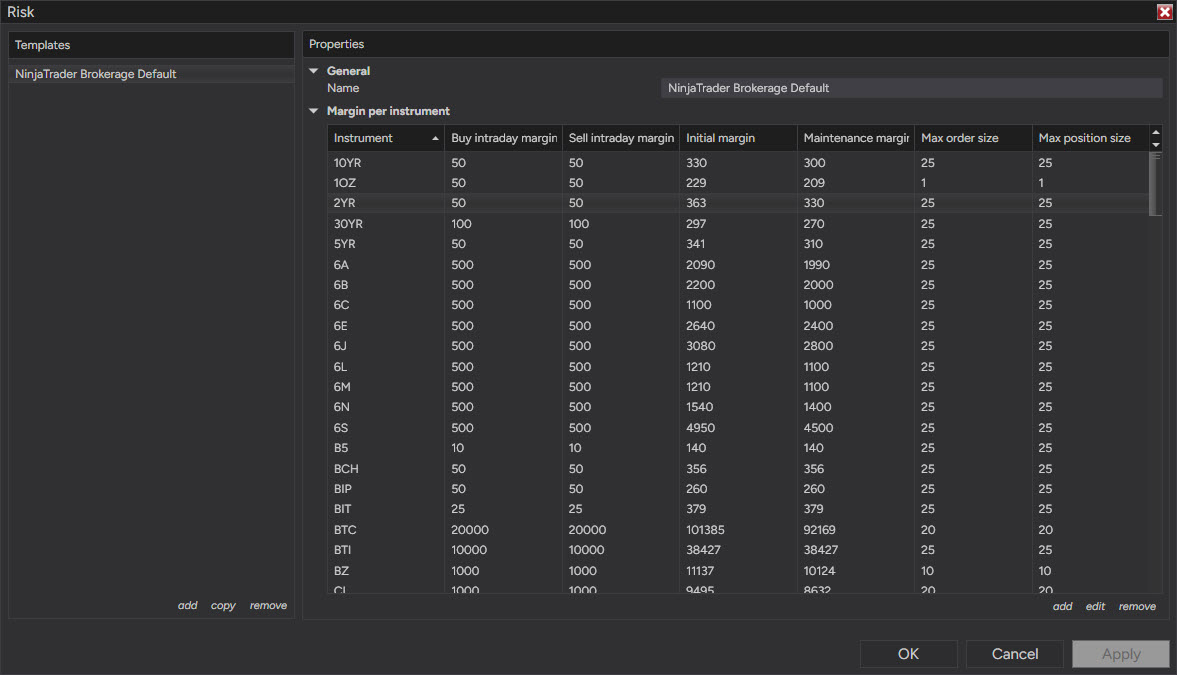
The Risk window (Tools › Risk) holds risk templates: buy and sell intraday margin, initial and maintenance margin, max order size and max position size, set per instrument. An order that breaks one of the size limits is rejected. The catch is in where they apply: risk templates hold the definitions for local simulation accounts such as Sim101, not for a broker or prop account, and none of the fields counts money lost.
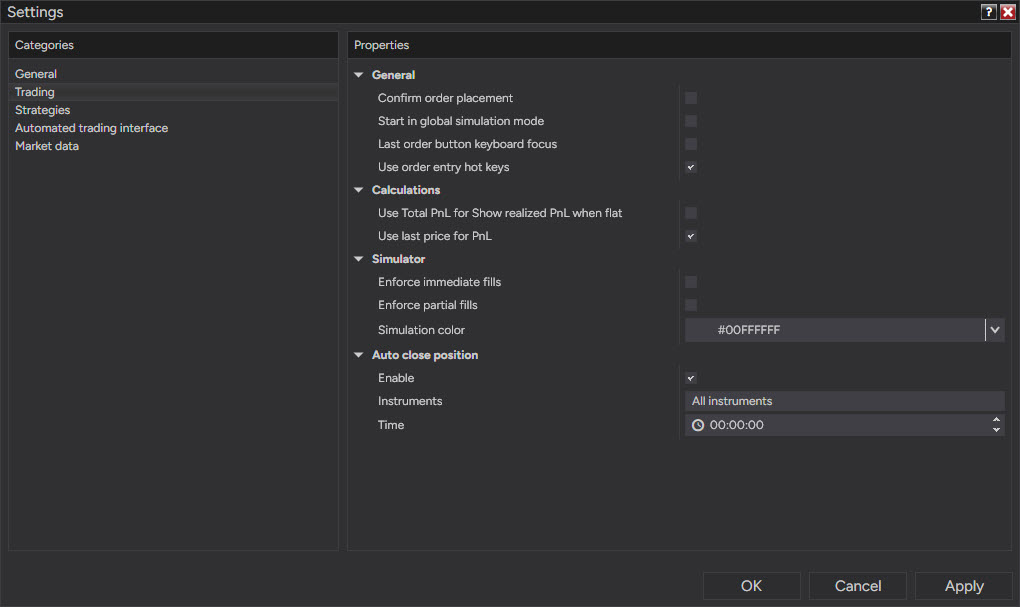
Auto close position sits in Tools › Settings › Trading (the window was called Options until version 8.1.5 renamed it). Tick Enable, pick the instruments and a time, and NinjaTrader attempts to close those positions at that time. It's a clock: useful for being flat before a firm's end-of-day snapshot, no help on a losing morning.
The Accounts tab in the Control Center can show columns named Daily loss limit, Weekly loss limit and Trailing max drawdown. The first two read as the share of the limit already used, the last as what's left. They're read-outs of limits set elsewhere; nothing in the tab sets one.
Where a daily limit can live
A limit that flattens a position and blocks the next order has to sit between you and the market, on a server. There are three kinds.
The firm's daily loss limit. At the time of writing, LucidFlex and LucidPro both let you switch a daily loss limit on or off at checkout, and the choice can't be changed on an active account; with it on, a 50K LucidPro evaluation has a $1,200 limit. Apex's end-of-day evaluations carry one and its intraday evaluations don't. When it's hit, the account can't trade for the rest of the session (Apex also liquidates open positions at market), and the account survives: Lucid treats every daily limit as a soft breach, and Apex states that hitting it does not fail the account. The max loss limit underneath is the one that ends accounts. You don't set the firm's number, and it's usually larger than the one you'd pick for yourself: Apex pairs a $1,000 daily limit with a $2,000 drawdown on its 50K end-of-day evaluation.
Account risk settings. On an account held at NinjaTrader Brokerage, the Dashboard has Settings › Accounts › Risk Settings, with a Daily Loss Limit, a Weekly Loss Limit, profit triggers and a trailing max drawdown. These loss limits are measured on realized P&L only, so an open loser doesn't count until it's closed; the real-time trailing max drawdown is the setting that watches open P&L. When a limit is reached, a market order closes the open positions, working orders are cancelled and the account can only reduce positions: a daily limit releases at 5:00 PM CT (6:00 PM ET), a weekly one at 5:00 PM CT on Sunday, and a trailing max drawdown lock stays until support lifts it. In a fast market that market order can make the final loss bigger than the limit.
Prop accounts hosted on NinjaTrader's own prop platform, which serves firms built on NinjaTrader and Tradovate, get a version of the same settings at the time of writing: a daily and a weekly loss limit and profit targets set by the trader, with a daily limit that counts realized and unrealized losses and locks the account for the rest of the session. An optional Risk Settings Lock freezes the settings the moment a limit fires, so they can't be loosened or switched off until the daily reset at 4:00 PM CT. The settings live on the account, so they hold on the desktop, on the web and in the phone app, and whether a given firm lets its traders change them is the firm's decision.
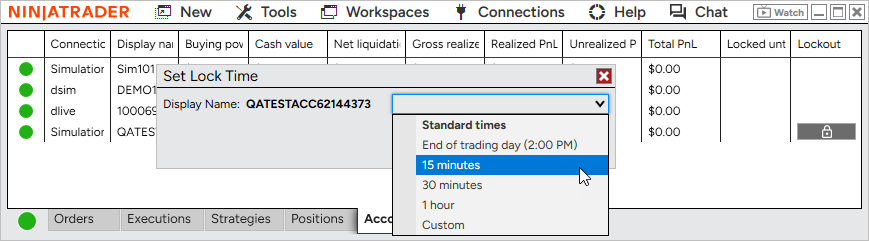
The manual lockout. The same prop platform has a lockout you start yourself, on its simulated evaluation and funded accounts. It closes the account's positions, cancels its working orders and rejects new orders on every platform until it expires, and once it's on it can't be cancelled early. NinjaTrader's web and phone apps offer it for 15 minutes, 30 minutes, an hour, the end of the session or a custom period up to 24 hours. Version 8.1.8 of the desktop platform, released July 21, 2026, added it to the Accounts tab for prop accounts on the NinjaTrader connection, the Tradovate-based connection the Lucid setup above uses. Nothing starts it for you, so it isn't a limit in the automatic sense. It's the switch you pull when your own number is reached.
What an ATM strategy limits
One trade. The stop loss in an ATM strategy caps the loss on the bracket it's attached to, Auto Breakeven and Auto Trail move that stop, and nothing in the template adds trades together. The nearest an ATM gets to a daily limit is arithmetic you enforce yourself: a limit of two full stops is two entries with the ATM's stop, and the third entry is a rule you break with a click. The stop order waits at the broker and survives a crash, unless it's one of NinjaTrader's simulated order types. The logic that trails it runs inside NinjaTrader and stops with it; the exception is server-side ATMs, an opt-in beta that works only on the NinjaTrader connection with Multi-provider off (the Lucid setup above turns Multi-provider on) and keeps a simpler, one-step trail running with the platform closed.
Lockout add-ons
Add-ons written in NinjaScript fill the gap on the platform side, and most of them work the same way. The add-on reads the account's realized and unrealized P&L through NinjaTrader's Account object, and when the total crosses your number it flattens the positions, cancels working orders and then cancels or closes whatever appears next.
Three limits come with the design. It runs only while NinjaTrader runs, so with the platform closed an order sent from a phone or a web platform on the same account meets nothing at all. It counts the P&L NinjaTrader sees, which isn't always the number the firm's rulebook counts. And NinjaTrader has no supported way for NinjaScript to stop a manual order before it's sent, so the add-on reacts to a new order rather than preventing it: quickly, but after. It works as a tripwire with an automatic flatten, which still covers the expensive case, a trader past the limit reaching for the Buy button.
The WotT Risk Manager on the tools page belongs to this group: a hard daily limit that flattens everything and cancels or closes anything placed after the limit is hit, coming soon at the time of writing. Other vendors sell similar add-ons, and a few give them away.
The layers side by side
| Firm daily limit | Account risk settings | Manual lockout | ATM stop | Add-on | |
|---|---|---|---|---|---|
| Who sets it | the firm; you pick the plan at purchase | you, where the broker or firm allows it | you, when you start it | you, per trade | you |
| Counts the day's loss | yes | yes (brokerage accounts: realized only) | no, it's manual | no, one trade | yes |
| Closes open positions | Apex yes; Lucid's pages mention only the lock | brokerage accounts yes; NinjaTrader's prop pages mention only the lock | yes | its own position | yes |
| Blocks new orders | yes | yes | yes, on every platform | no | reacts to them |
| Works with NinjaTrader closed | yes | yes | yes | the stop yes; the trail only with server-side ATMs | no |
Choosing the number
Two checks decide whether a daily limit helps or just fires. The first: it has to be bigger than one normal loss with costs. A 40-point stop on two MNQ contracts (the Micro E-mini Nasdaq-100, $2 a point) costs $160 before commissions and slippage, so a $150 limit is used up by one ordinary loser, 2.5 points before its stop. The second: it has to be small against the drawdown. On a 50K account with a $2,000 max loss, four $500 days in a row use up the whole drawdown, and so do five $400 days or two $1,000 days. A firm limit at half the drawdown means two bad sessions in a row end the account, which is the argument for a personal limit below the firm's.
Stating the limit in full stops rather than dollars keeps it tied to the setup, which is where the stop belongs; the dollar check against the drawdown is the same unit count that drives risk of ruin.
My own trading contract has a hard daily stop, and the Risk Manager is that clause written as software. The rule was written by the calm version of me; it has to be enforced on the version that just took the second full loss, and software doesn't renegotiate.
Educational content, not investment advice. Futures trading involves substantial risk of loss. Examples are for illustration only. Read the full Risk Disclosure.