Market Replay in NinjaTrader 8: Practicing a Setup Without Burning an Evaluation
An evaluation charges drawdown for every lesson. Market Replay charges nothing: the same tick data, the same charts, the same ATM, on a session you choose. How to download it, what Playback101 does differently, and a practice protocol that transfers.
An evaluation is a bad classroom. Every lesson costs drawdown, the market only teaches whatever it happens to do today, and you can't repeat the lesson to see whether you learned it. Sim101 with a live feed fixes the first problem and none of the others. Market Replay fixes all three: NinjaTrader 8 plays a recorded session back into your normal charts, tick by tick, with the bid and ask, and you trade it with the same chart templates, the same ATM and the same size as a live session, on a day you picked because it has the thing you want to practice.
What Market Replay is, and what it isn't
Replay runs through its own connection, called Playback, and its own account, Playback101. When Playback is connected, NinjaTrader treats the recorded data as a live feed: bars build, indicators calculate, Chart Trader and the SuperDOM accept orders, and every window replays in sync, so you can have a 5-minute chart, a tick chart and a DOM on the same instrument and they all move together. The data is either Market Replay data, which NinjaTrader recorded itself and which contains the exact sequence of Level I trades and Level II depth updates, or plain historical tick data from your data provider, which has no depth and simulates the bid/ask as the last price plus or minus a tick.
It is not a backtester. The Strategy Analyzer runs NinjaScript code over history and prints a report; Replay puts you in the chair. It is also not the live simulator: Sim101 delays fills to imitate internet latency, Playback101 processes orders immediately and synchronously so that results are reproducible. Playback101 takes its commission and risk settings from Sim101 at connection time and cannot be changed while connected, and NinjaTrader recommends a separate workspace for it so your live charts and drawings are untouched.
Setting it up
Disconnect from everything. Playback refuses to connect while another connection is open, including the Tradovate connection to a prop account. Control Center, Connections, disconnect.
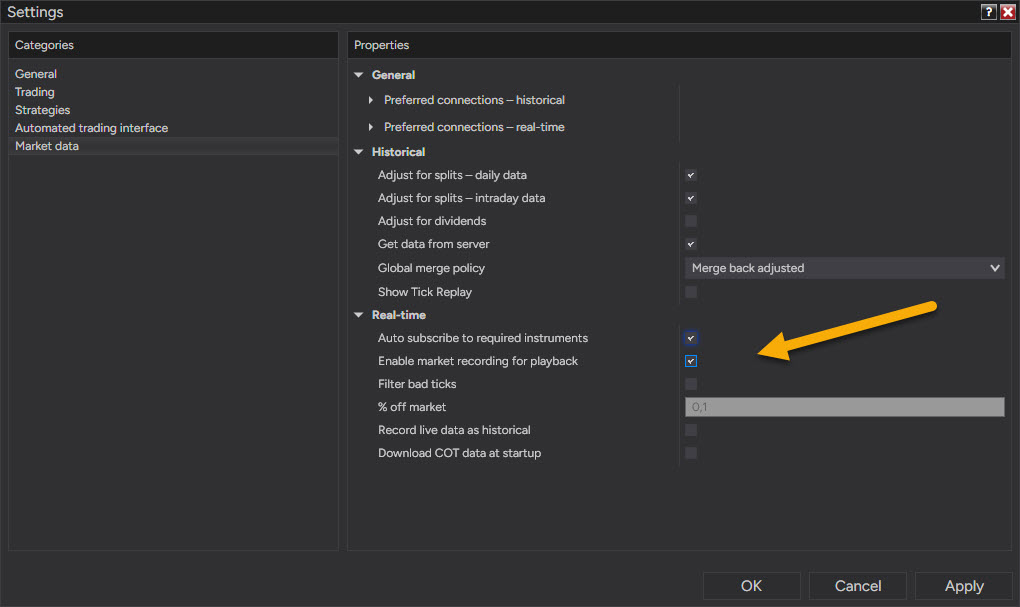
Turn the recorder off before downloading. Tools, Settings, Market data (Options before version 8.1.5): "Enable market recording for playback" has to be unchecked before downloading, because a downloaded day can overwrite one you recorded yourself. Turn it back on later if you want to record your own live sessions (below).
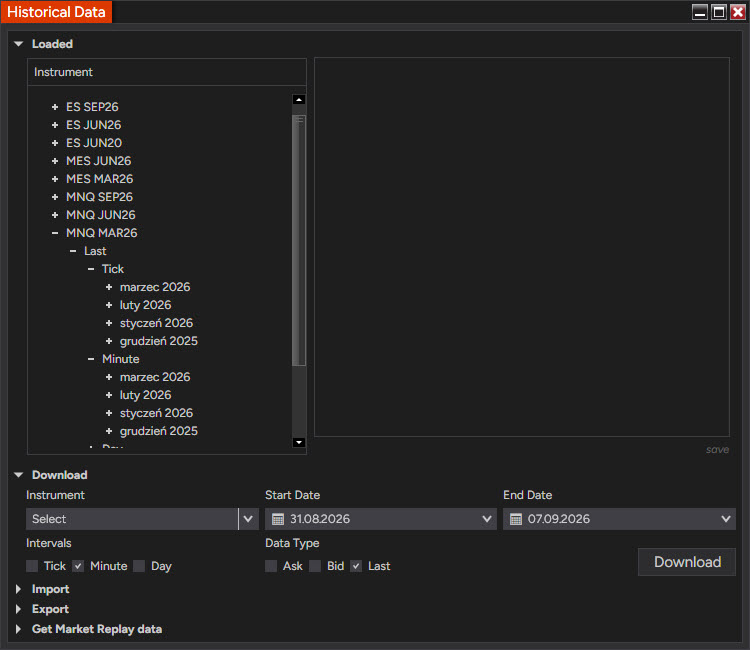
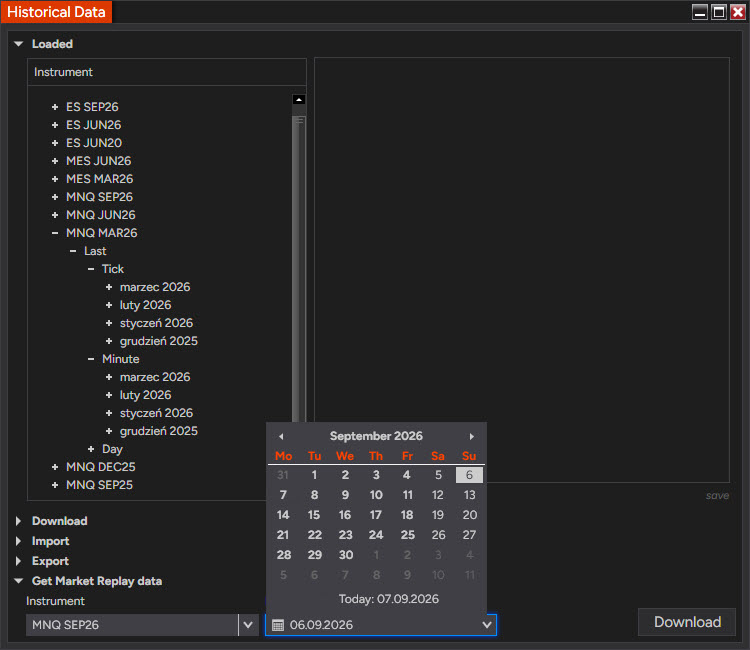
Download the session. Connections, Playback Connection opens the Historical Data window before it connects. Expand Get Market Replay data, pick the instrument as NinjaTrader names it (MNQ SEP26 until the September roll, MNQ DEC26 after it), pick the date, Download. The download runs in the corner of the window; closing the window cancels it. NinjaTrader keeps a limited window of recent sessions on its server for the common contracts, so a day you want to keep should be downloaded while it is still listed. Only one instrument and one day per download.
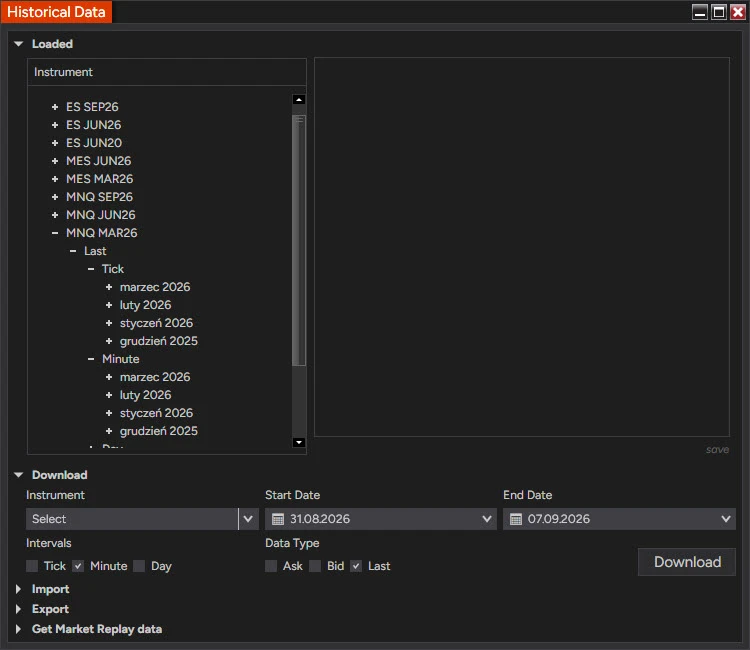
The Historical Data window opens before Playback connects. The Loaded tree shows what is already on disk; the section you want is the last one, Get Market Replay data. 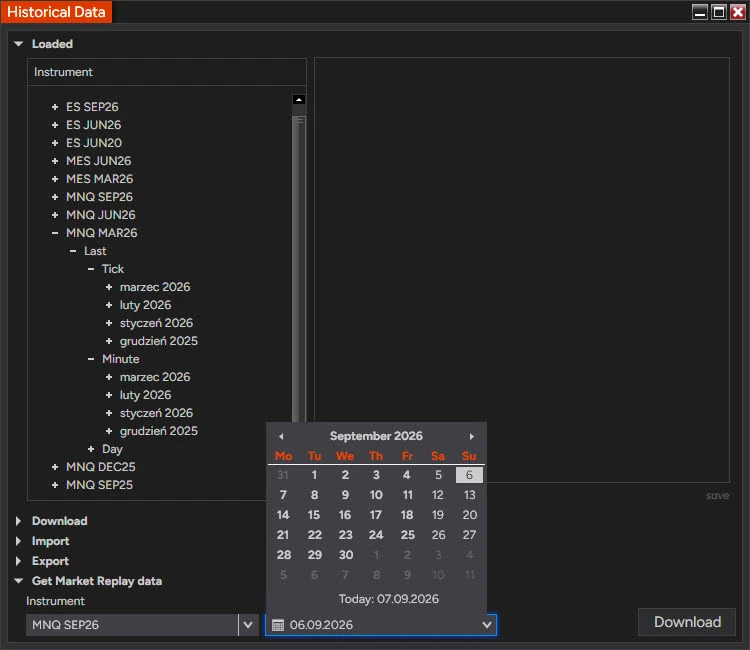
Get Market Replay data expanded: one instrument, one date, Download. The picker takes a single day, which is why each session is a separate download. Open a replay workspace. File, New, Workspace, then the same chart templates and the same ATM strategy template you use live. Save it under a name like Replay so it never gets confused with the live one.
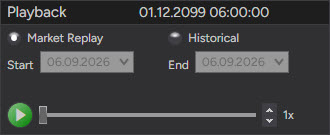
Connect and set the account. Connections, Playback Connection. The Playback control appears with the date and time of the play head in its caption; set the speed to 1× and press play. In Chart Trader or the SuperDOM, select Playback101 as the account. Orders go to the exchange simulator inside NinjaTrader, never anywhere real.
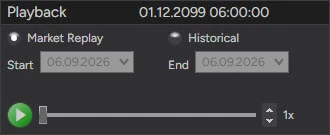
The Playback control after connecting. Market Replay selected, play head time in the caption, speed at 1×. The slider moves the play head; the spinner changes the speed. 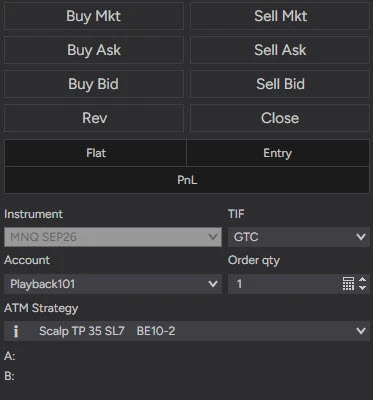
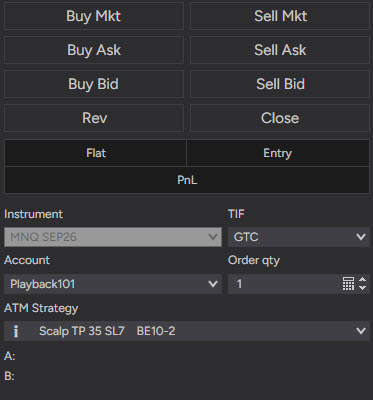
Chart Trader with Playback101 as the account and the same ATM strategy as a live session. Everything else in the panel is identical to live.
Recording your own sessions is the other way to get data: with the option from step 2 enabled, NinjaTrader records every instrument that is receiving live data in any window. Depth is only recorded while a SuperDOM or Level II window for that instrument is open, so open one if you want the DOM to replay later. Recorded and downloaded sessions live in the db\replay folder under the NinjaTrader 8 documents folder.
A practice session that transfers
Replay only teaches something if the session is run the way a live one is. The protocol that makes the difference:
Pick the day before you look at it. Choose by what you want to practice (a CPI morning, a trend day, a day the range broke and failed) from the calendar or from your journal, not by scrolling to a day that looks good in hindsight.
Prepare as if it were tomorrow. Jump the play head to the evening before, mark the levels from the prior day and the overnight range, write the plan. The point of replay is the decision, and the decision starts before the open.
Run 1× where you trade, faster where you don't. Playback goes from below real time to a maximum that depends on your machine. At 10× an eight-minute rotation lasts 48 seconds and your reaction is not part of the test. Speed through the Asian session, then drop to 1× for the window you would trade live.
Same ATM, same size, same journal. If the live bracket is a stop-market and a limit target, the replay bracket is too. Log the replayed trades in the same fields as live ones, marked as replay, so you can compare a setup's replay results with its live results later. Trade Performance shows Playback101 while connected; export it before you disconnect or change the date, because the account resets when either happens (the MAE/MFE columns in that export are the ones to be careful with).
Repeat a day for execution, not for the answer. Running the same session twice is useful for practicing an entry mechanic. Running it a fourth time, you are trading a chart you have memorized.
What replay gets wrong
| Live | Replay |
|---|---|
| Fills wait in the queue; a limit at the level may not fill on a touch | Playback101 fills at the touch, immediately |
| Latency between click and exchange | none |
| Slippage on stops in fast markets | modeled from the recorded tape, usually kinder than reality |
| Money at risk, and the decisions it distorts | none, which is the feature and the limit |
| Depth from the live feed | only if the recording contains it |
| Session-end order expiry | not supported on Playback101 |
The first line matters most for anyone who enters with limit orders: a replay strategy that lives on touch fills will look better in replay than on an account. Count only the trades where price traded through the level, or accept that replay is measuring the setup and not the fill.
Replay is where a rule change goes before it goes near an evaluation. A wider stop, a later entry, a new filter: five replayed sessions of the same kind cost nothing and show whether the change survives contact with a tape. If it doesn't survive there, it won't on a live account with a drawdown, and finding that out on Playback101 is the cheapest lesson NinjaTrader offers.
Educational content, not investment advice. Futures trading involves substantial risk of loss. Examples are for illustration only. Read the full Risk Disclosure.